See exactly what changed between two Excel files. Then merge it.
Tidyfield Compare runs inside Excel on Windows, Mac and the web. It finds every changed value and formula, spots inserted and deleted rows instead of flagging everything below them, highlights the cells in your workbook, and merges the changes you pick.
14-day free trial of every feature, no card needed. Then $59 per year or $149 for life. Files never leave your computer.
Works where Microsoft's tool doesn't
Spreadsheet Compare only ships with enterprise Office on Windows. Tidyfield Compare works in Excel for Mac, Excel for the web and every Microsoft 365 plan.
Inserted rows stay quiet
Automatic row matching means one inserted row is one inserted row, not five hundred "changed" cells. Or match rows by an ID column, or by position.
Formulas, not just results
A cell that shows the same number but has a different formula is flagged as a formula change. Turn it off when you only care about values.
Merge the cells you choose
Tick the differences you want, click Merge, and the "after" values and formulas are written into your open workbook. The previous contents go to a merge log sheet so you can put them back.
Highlight and report
Colour changed cells in place and clear the colours later. Add a report sheet listing every difference, or export CSV for an audit file.
Private by design
Everything runs in the add-in on your machine. No uploads, no servers, no account. The licence check is the only network call.
How it works
- Open the workbook in Excel and open Tidyfield Compare from the Home tab.
- Pick what to compare: this workbook against a saved file, two sheets of this workbook, or two files.
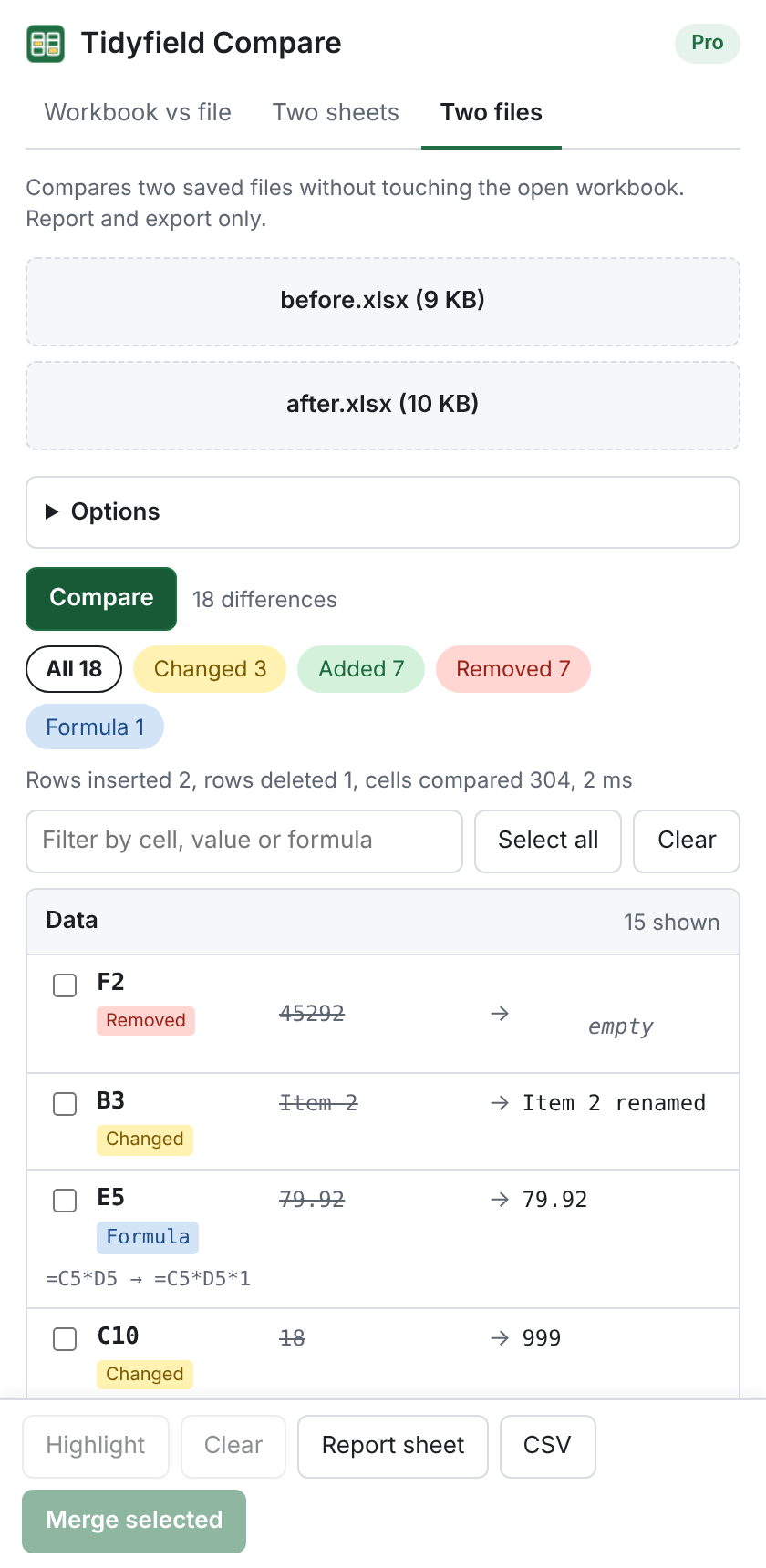
- Click Compare. Changed, added, removed and formula differences are listed per sheet with before and after values. Click any row to jump to the cell.
- Highlight the cells, write a report sheet, export CSV, or tick differences and Merge them into the workbook.
Compared with the alternatives
| Tidyfield Compare | Microsoft Spreadsheet Compare | Windows COM add-ins | |
|---|---|---|---|
| Excel for Mac | Yes | No | No |
| Excel for the web | Yes | No | No |
| Microsoft 365 Business and Personal plans | Yes | No (enterprise and Professional Plus only) | Yes |
| Detects inserted and deleted rows | Yes | No | Some |
| Merge selected changes | Yes | No | Some |
| Price | $59 per year or $149 lifetime | Not sold separately | About $45 to $99 per licence, Windows only |
Get Tidyfield Compare
Free
- Compare workbooks, sheets and files
- First 100 differences shown
- Online compare tool with no limits
Pro, yearly
- Unlimited differences
- Merge, highlight, report sheet, CSV
- Use on 3 devices
- Updates included
Start with the 14-day trial: install the add-in (about a minute, from a small file on this site) and every Pro feature is on. Buy a key when the trial ends. Teams of 5 or more: ask for a quote.
Questions
How do I install it?
Download the add-in file from this site and add it to Excel with Upload My Add-in (Excel on the web), a one-time folder copy (Mac) or a shared folder (Windows). Microsoft 365 admins can deploy it to everyone from the admin center. The install page has the steps.
Does it handle large workbooks?
Sheets with a few hundred thousand cells compare in seconds. Reading the open workbook is chunked, so very large sheets take longer but do not freeze Excel. The results list shows 200 differences at a time per sheet with a Show more button.
What about .xls and .csv?
Save them as .xlsx first (File, Save As). The add-in and the online tool read .xlsx and .xlsm.
Can it insert the rows that are missing?
Merge writes cell values and formulas into rows that exist in both versions. Rows that only exist in the other file are listed with their contents so you can copy them, and inserting them automatically is on the roadmap.
Is my data uploaded?
No. The comparison runs in the add-in task pane on your computer. The only network request is to check your licence key.
Which Excel versions?
Microsoft 365 on Windows and Mac, Excel for the web, and Excel 2021 or later. Excel 2016 and 2019 are not supported.